Network Namespaces in Linux
I am a certified Kubernetes Admin and a VCP 7.x professional with 9 + years of experience in designing and building Highly available Virtualization environment for our customers. A devops enthusiast who is adept at Docker, Kubernetes, Jenkins, Terraform, AWS, Powershell scripting, windows server administration, Linux administration.
Network namespaces are used by container runtimes like docker to implement network isolation. Containers are separated from the underlying host by using namespaces. Docker implements this using Linux namespaces. Let us demonstrate this by creating 2 namespaces red and blue.
Run these commands:
ip netns add red
ip netns add blue
To list the namespaces, run
ip netns
To link these namespaces or to interconnect them we need to create a virtual ethernet pair, a veth pair which is known as a pipe or virtual cable.
ip link add veth-red type veth peer name veth-blue
Now connect one end of the veth pair to red namespace and other end to blue namespace.
ip link set veth-red netns red
ip link set veth-blue netns blue
Assign ip addresses to these network namespaces, we will use
ip -n red addr add 192.168.15.1 dev veth-red
ip -n blue addr add 192.168.15.2 dev veth-blue

or
ip netns exec red addr add 192.168.15.2/24 dev veth-red
ip netns exec blue addr add 192.168.15.3/24 dev veth-blue
Now bring up these interfaces:
ip -n red link set veth-red up
ip -n red link set veth-blue up
Now if we ping the ip address of blue namespace from red namespace to check the connectivity and vice-versa.
ip netns exec red ping 192.168.15.2
ip netns exec blue ping 192.168.15.3
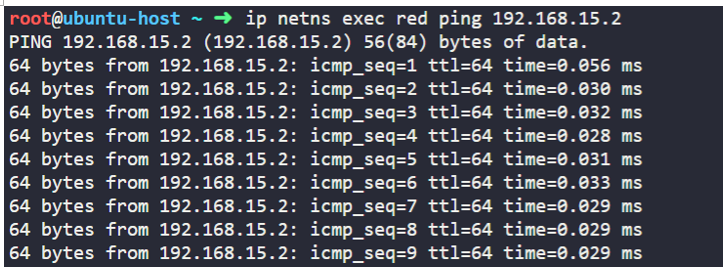
We can check the arp entries from red and blue namespaces and we will see the respective entries.
ip netns exec red arp
ip netns exec blue arp

Important thing to note here is that if we run arp from the underlying host we won’t see the above entries yet. To connect the multiple namespaces together and host we need to use a bridge or a switch. There are different solutions like Linux Bridge, which is native to Linux and open vswitch. We will employ Linux Bridge here to understand this.
For this example, we will use network 192.168.15.0/24.To create a new bridge, we run the command
ip link add v-net-0 type bridge
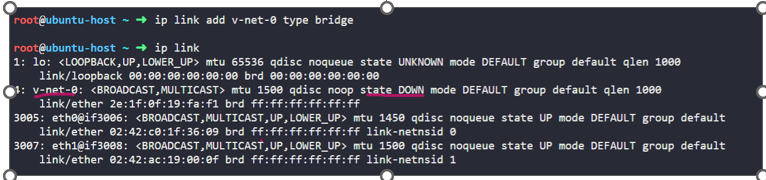
For our Linux host v-net-0 it is just another interface we can see by running command ip link and see v-net-0 there. Bring it up using command
ip link set dev v-net-0 up
qSo, this interface acts as a switch for the namespaces. Now we need to connect the namespaces to this switch/bridge. we will create a new veth pair or pipe.
ip link add veth-red type veth peer name veth-red-br
ip link add veth-blue type veth peer name veth-blue-br
Attach one end of this veth pair to the namespace and other to the bridge for both the namespaces red and blue. we need to specify the master for it to connect it to the bridge network.
we can use brutil as well to create bridge network and connect the network namespaces.
ip link set veth-red netns red
ip link set veth-red-br master v-net-0
ip link set veth-blue netns blue
ip link set veth-blue-br master v-net-0
Assign ip addresses and turn the links up
ip -n red addr add 192.168.15.2/24 dev veth-red
ip -n blue addr add 192.168.15.3/ 24 dev veth-blue
ip -n red link set veth-red up
ip -n blue link set veth-blue up
So far we have understood that a bridge is just another interface for host, so we can assign it the IP address and bring it up, so that it can reach to namespaces.
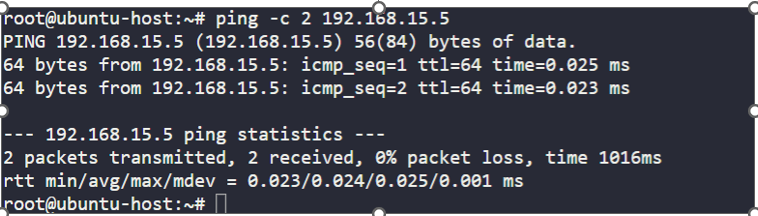
ip addr add 192.168.15.5/24 dev v-net-0
ping the bridge network ip from the underlying host, ubuntu in our case, we get a response back.
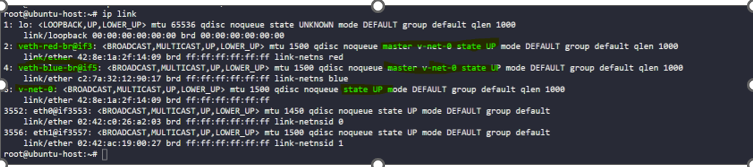
we can see our veth pair or pipe is up now, which is basically two network interfaces connected together.
Test the interconnectivity of network namespaces. we get a response back.
ip netns exec blue ping -c 2 192.168.15.2
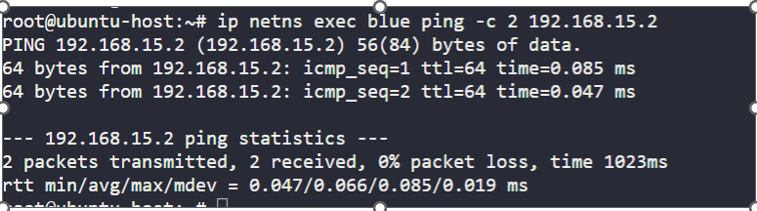
Now if we ping the ip's of our network namespaces from our underlying host, which is ubuntu in this case, we can see the response.
ping -c 2 192.168.15.2

This entire network is private and restricted within the host. From within the namespaces, we can neither reach to the outside world nor can the services running inside these namespaces be reachable from outside. The only door to the outside world is the ethernet port on the Host. How do we connect it to outside network – we can connect that ethernet to LAN. Say our external network is 192.168.1.0
Eth0 of our host 192.168.1.2 LAN – 192.168.1.0
From blue namespace we can add a route like
ip netns exec blue ip route add 192.168.1.0/24 via 192.168.15.5
If we want to reach outside to the network say from blue namespace we can add a route.
ip netns exec blue ip route add default via 192.168.15.5
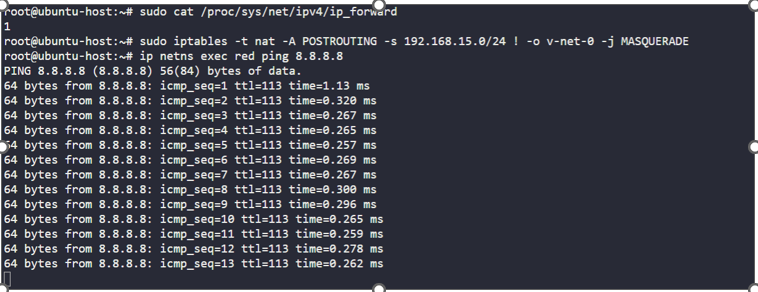
if we try to ping say google dns ip 8.8.8.8, we won't receive a response yet unless we add the below rule to the iptables of our underlying host and also making sure that forwarding is enabled.
iptables -t nat -A POSTROUTING -s 192.168.15.0/24 -j MASQUERADE
This means masquerade or replace the from address from all packets with its own address, this makes the external network think that packets are coming from host and not from inside the network namespaces.
Connectivity from outside world to our namespaces
-------------------------
there are 2 ways: the first one is that we can give away the identity of the private network by adding a route to it in the routing table of external host which is not preferrable. Second one is that we can add a port forwarding rule which is a preferred way.
iptables -t nat -A PREROUTING – dport 80 –to-destination 192.168.15.2:80 -j DNAT