Docker Networking
I am a certified Kubernetes Admin and a VCP 7.x professional with 9 + years of experience in designing and building Highly available Virtualization environment for our customers. A devops enthusiast who is adept at Docker, Kubernetes, Jenkins, Terraform, AWS, Powershell scripting, windows server administration, Linux administration.
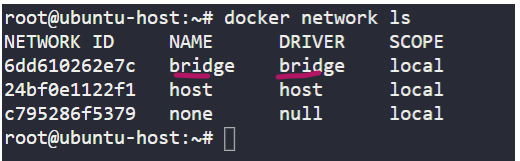
Docker implements three types of networking, none, host and bridge and out of these three, bridge is the default network that a docker uses to connect the containers when it is installed on a host. Assuming that docker runtime is installed on the host, we can list the network by running the below command.
docker network ls
From the output of the above command we can see the types on network.
running iplink command from the underlying host on which the docker is installed we can see the bridge network as bridge0 which is currently down.

This docker0 acts as a bridge for the network namespaces but it just an interface for the underlying host. By default docker uses 172.17.0.1 for the internal bridge network.

When we create a container docker creates a network namespace for the container. Docker uses Linux Network Namespaces to isolate the containers. Let us spin up an nginx container.
docker run -d nginx
Docker ps command will show us the container id of the running container, its name, image used and other stuff. We will inspect this container by running docker inspect "container id"
docker ps
docker inspect 332726965a40

When we inspect the network settings of our container, we get to see the namespace and other bridge network details for our container.
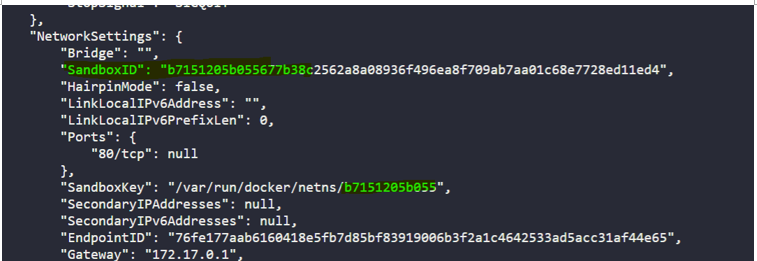
We can use ip netns command to view the details of the veth pair for the container or the network namespace created for it. There is a hack to run the ip netns from the docker host which is ubuntu in this case. Run the command
ln -s /var/run/docker/netns /var/run
Now run ip netns and see the magic. So it lists the network namespace that docker created for our nginx container.

Now if we exec into this network namespace that docker created for our nginx container we get to see one end of the veth pair here which is eth0@if8.
Now run the command to check the ip address.
ip -n b7151205b055 addr
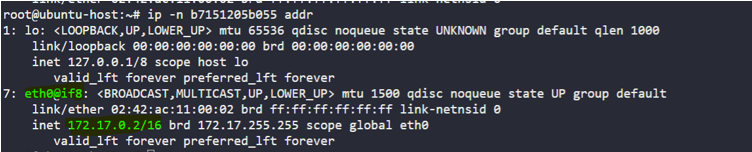
So how does docker connect this network namespace to the bridge network. Docker basically creates a virtual cable with 2 interfaces one at each end of the cable. Let us see how.
Ip link command on the underlying docker host shows us one end of the link i.e. veth961d4d8@if7 to bridge and ip -n b7151205b055 link command in the network namespace for nginx container shows us the other end eth0@if8 of the veth pair. Note that odd even makes a pair here it is if7 and if8.
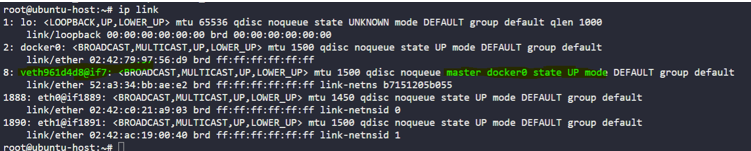
Same thing happens when another container is created, docker creates a network namespace, creates a virtual ether cable, attaches one end to network namespace and other end to bridge network. Odd and even for a pair.
Let us spin up another nginx container. Inspect the container, its namespace and exec into the network namespace and check the link. Check the interface for the bridge network from the docker host as well.
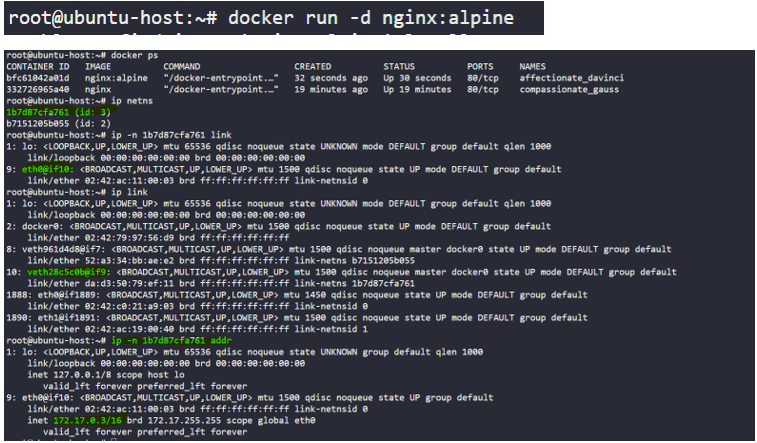
To isolate this second instance of nginx container, docker has created a new network namespace 1b7d87cfa761 for it. Afresh veth pair with one end/interface eth0@if10 connected to the network namespace and other interface veth28c5c0b@if9 of this pair connected to the docker bridge.
That explains how docker implements the bridge network to isolate the containers. We can create our own bridge network as well. The driver option accepts bridge or overlay.
we can specify the ip range, subnet and gateway as well for our bridge network. Then connect the containers to this network when we create them.
docker network create -d bridge my-bridge-network
So the similar pattern of commands/approach we showed here is used by CNI [container run time interfaces] for Kubernetes. There are a lot of network solutions available like rkt, Mesos - which implement the networking in the same way.